From Manual Testing to Full Automation with Postman
If you've been using Postman just to send HTTP requests and check status codes, you're barely scratching the surface. I just published a comprehensive guide on my QE Hub that takes you from basic API testing to building professional-grade automation pipelines.
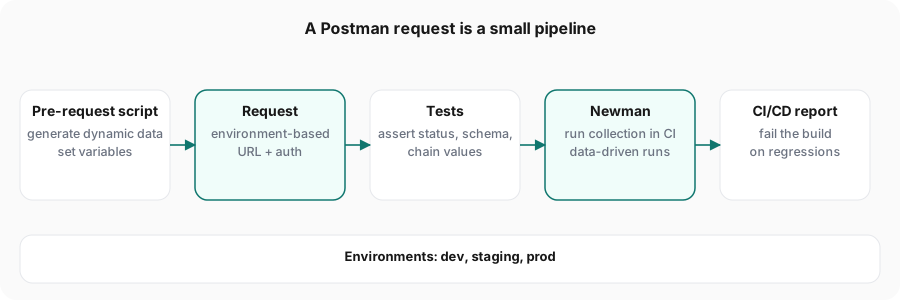
What You'll Learn
The guide covers everything I wish someone had taught me when I started with API testing:
Dynamic Test Data Generation
Stop hardcoding test data! Use pre-request scripts to generate UUIDs, timestamps, random data, and even auto-refresh authentication tokens.
// Pre-request Script - Generate dynamic test data
pm.environment.set('orderId', pm.variables.replaceIn('{{$guid}}'));
pm.environment.set('timestamp', new Date().toISOString());
pm.environment.set(
  'randomEmail',
  `test_${Math.random().toString(36).substring(7)}@example.com`,
);

// Generate random product quantity between 1-10
const quantity = Math.floor(Math.random() * 10) + 1;
pm.environment.set('quantity', quantity);
This ensures every test run uses fresh, unique data—no more flaky tests from duplicate records!
Environment Management (CRUD)
Programmatically create, read, update, and delete environment variables. Build dynamic test workflows that adapt based on responses.
// Test Script - Save API response data to environment
const response = pm.response.json();

// Create/Update environment variables
pm.environment.set('authToken', response.token);
pm.environment.set('userId', response.user.id);

// Read environment variable
const baseUrl = pm.environment.get('baseUrl');

// Delete when no longer needed
pm.environment.unset('tempVariable');
Perfect for chaining requests where the output of one API call becomes the input for the next.
Advanced Test Scripts
Move beyond pm.expect(status).to.equal(200) with schema validation, business logic testing, performance assertions, and reusable test utilities.
// Test Script - Comprehensive API validation
pm.test('Status code is 200', () => {
  pm.response.to.have.status(200);
});

// JSON Schema Validation
const schema = {
  type: 'object',
  required: ['id', 'email', 'createdAt'],
  properties: {
    id: { type: 'string' },
    email: { type: 'string', format: 'email' },
    createdAt: { type: 'string' },
  },
};

pm.test('Response matches schema', () => {
  pm.response.to.have.jsonSchema(schema);
});

// Performance assertion
pm.test('Response time is acceptable', () => {
  pm.expect(pm.response.responseTime).to.be.below(500);
});

// Business logic validation
const user = pm.response.json();
pm.test('User is active', () => {
  pm.expect(user.status).to.equal('active');
  pm.expect(user.emailVerified).to.be.true;
});
Request Chaining & Workflows
Build complete end-to-end test scenarios by chaining requests together. Extract data from one request and use it in the next.
// Request 1: Create User - Test Script
const newUser = pm.response.json();
pm.environment.set('userId', newUser.id);
pm.environment.set('authToken', newUser.token);

// Request 2: Create Order - Use {{userId}} in URL or body
// POST /api/users/{{userId}}/orders
// Headers: Authorization: Bearer {{authToken}}

// Request 3: Verify Order - Test Script
const order = pm.response.json();
pm.test('Order belongs to correct user', () => {
  pm.expect(order.userId).to.equal(pm.environment.get('userId'));
});
This enables you to test complex user journeys like signup → login → purchase → order verification in a single collection run.
Newman CI/CD Integration
Take your Postman tests from manual execution to fully automated CI/CD pipelines with GitHub Actions, Jenkins, and scheduled monitors.
# .github/workflows/api-tests.yml
name: API Tests
on: [push, pull_request]

jobs:
  api-test:
    runs-on: ubuntu-latest
    steps:
      - uses: actions/checkout@v3

      - name: Install Newman
        run: npm install -g newman newman-reporter-htmlextra

      - name: Run Postman Collection
        run: |
          newman run collection.json \
            --environment prod.json \
            --reporters cli,htmlextra \
            --reporter-htmlextra-export reports/api-test-results.html

      - name: Upload Test Report
        if: always()
        uses: actions/upload-artifact@v3
        with:
          name: test-report
          path: reports/
Now every code push automatically runs your full API test suite!
Data-Driven Testing
Run the same test with multiple data sets using CSV and JSON files. Perfect for testing edge cases and validation rules.
# Run collection with CSV data file
newman run collection.json -d test-data.csv

# test-data.csv structure:
# email,password,expectedStatus
# valid@test.com,Pass123!,200
# invalid@test,weak,400
# admin@test.com,Admin123!,200
In your collection, reference data with {{email}}, {{password}}, etc. Newman runs the collection once per CSV row—1 file, 100 test scenarios!
Why This Matters
API testing is often the fastest and most reliable way to catch bugs before they reach production. Unlike UI tests that can be flaky and slow, API tests:
- Run 10-100x faster than UI tests
- Catch issues before the UI is built
- Are more stable and less prone to breaking
- Can run in CI/CD pipelines automatically
Real-World Examples
The guide includes practical examples for:
- E-commerce checkout workflows
- User authentication and token management
- Contract testing with mock servers
- Performance monitoring
- Error handling and retry logic
Check It Out
Ready to level up your API testing game?
It's a 25-minute read packed with code examples, best practices, and patterns you can use immediately in your projects.
Related Articles:
- API Testing with Cucumber BDD
- Building Production-Ready Spring Boot APIs
- UI Testing with Cucumber BDD
Happy testing!