In the modern web development landscape, choosing the right rendering strategy can make or break your application's performance, user experience, and SEO. Next.js, one of the most popular React frameworks, offers multiple rendering strategies to suit different use cases. But with options like SSG, SSR, ISR, and CSR, how do you choose the right one?
I built a comprehensive demo application to showcase all four major Next.js rendering strategies in action, complete with real-world examples, detailed explanations, and beautiful UI. In this article, I'll walk you through each rendering strategy, explain when to use them, and share insights from building this educational project.
What Is This Project?
The Next.js Rendering Strategies Demo is a fully functional web application that demonstrates how different rendering methods work in Next.js. Each strategy has its own dedicated page with:
- ✅ Live data demonstrations showing how the rendering works
- ✅ Visual indicators of when data is fetched or regenerated
- ✅ Complete code examples
- ✅ Use case recommendations
- ✅ Trade-off analysis
- ✅ Modern, responsive UI built with Tailwind CSS
You can explore the live project at: revana.link/nextjs-rendering
Why Rendering Strategies Matter
Before diving into the specifics, let's understand why choosing the right rendering strategy is crucial:
- Performance: Different strategies have vastly different performance characteristics
- SEO: Search engines need rendered HTML to index your content effectively
- User Experience: Initial load time and interactivity affect how users perceive your app
- Cost: Server-side rendering requires more infrastructure than static generation
- Freshness: Some strategies provide always-fresh data, while others serve cached content
The Four Rendering Strategies Explained
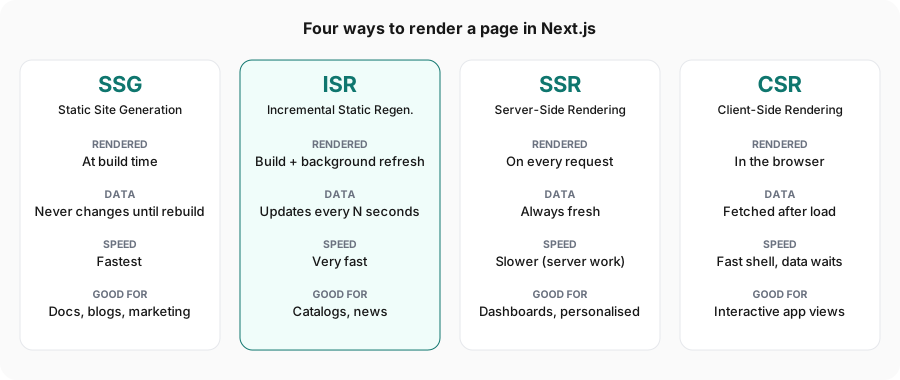
1. SSG (Static Site Generation) - The Speed Champion ⚡
What It Is: SSG pre-renders pages at build time, generating static HTML files that are served to all users. This is the fastest possible way to deliver content because you're essentially serving pre-built HTML files.
How It Works:
export const getStaticProps: GetStaticProps = async () => {
  const data = await fetchData();

  return {
    props: {
      data,
      buildTime: new Date().toISOString(),
    },
    // No revalidate = pure static generation
  };
};
When you run npm run build, Next.js executes getStaticProps, fetches your data, and generates HTML files. These files remain unchanged until you rebuild and redeploy.
When to Use SSG:
- Marketing and landing pages
- Blog posts that don't need frequent updates
- Documentation sites
- Portfolio websites
- Any content that's the same for all users
Advantages:
- ⚡ Lightning-fast page loads - Just serving static files
- 💰 Lower costs - Can be hosted on CDNs cheaply
- 🔒 Better security - No server-side processing per request
- 📊 Excellent SEO - Fully rendered HTML available immediately
Trade-offs:
- Content becomes stale until next rebuild
- Not suitable for personalized content
- Large sites can have long build times
2. ISR (Incremental Static Regeneration) - The Best of Both Worlds 🔄
What It Is: ISR is like SSG's smarter sibling. It generates pages statically but can regenerate them in the background at specified intervals, giving you the performance of static generation with the freshness of dynamic content.
How It Works:
export const getStaticProps: GetStaticProps = async () => {
  const data = await fetchData();

  return {
    props: {
      data,
      buildTime: new Date().toISOString(),
    },
    revalidate: 10, // Regenerate every 10 seconds
  };
};
The magic happens with the revalidate property. After the specified time:
- The first visitor after the revalidation period gets the stale (cached) content
- Their visit triggers a regeneration in the background
- Subsequent visitors get the fresh, regenerated content
When to Use ISR:
- Blog posts with periodic updates
- E-commerce product listings
- News articles
- Marketing pages with analytics data
- Any content that needs to be fresh but not real-time
Advantages:
- ⚡ Fast like static - Most requests serve cached content
- 🔄 Auto-updating - Content refreshes without rebuilding the entire site
- 📈 Scalable - Only regenerates pages that are accessed
- 💰 Cost-effective - Lower server load than SSR
Trade-offs:
- First visitor after revalidation sees stale content
- Not suitable for real-time data
- Complexity in managing revalidation strategies
Real-World Example: In my demo, the ISR page regenerates every 10 seconds. You can refresh the page multiple times and watch the timestamp update after the revalidation period - a perfect demonstration of how ISR balances performance with freshness.
3. SSR (Server-Side Rendering) - The Dynamic Powerhouse 🖥️
What It Is: SSR renders pages fresh on every request. Every time a user visits your page, the server fetches data, renders the HTML, and sends it to the browser.
How It Works:
export const getServerSideProps: GetServerSideProps = async (context) => {
  const data = await fetchData();
  const userAgent = context.req.headers['user-agent'] || 'Unknown';

  return {
    props: {
      data,
      requestTime: new Date().toISOString(),
      userAgent,
    },
  };
};
Notice how we have access to the request context, which includes headers, cookies, and other request-specific information.
When to Use SSR:
- Personalized dashboards
- Real-time data displays (stock prices, live scores)
- Authentication-required pages
- Pages that need request context (user location, device type)
- Frequently changing content that must be fresh
Advantages:
- 🔄 Always fresh - Data is fetched on every request
- 👤 Personalization - Access to user cookies, headers, and session data
- 📊 SEO-friendly - Fully rendered HTML for search engines
- 🎯 Request context - Can respond to specific request parameters
Trade-offs:
- 🐌 Slower - Must wait for server rendering on every request
- 💰 Higher costs - Requires server infrastructure and scales with traffic
- 🔥 Server load - More computational resources needed
Real-World Example: The SSR demo page in my project displays your user agent string and generates a new random number on every request - refresh the page and watch everything change instantly!
4. CSR (Client-Side Rendering) - The Interactive Experience 🌐
What It Is: CSR delivers a minimal HTML shell and then fetches data and renders content using JavaScript in the browser after the page loads.
How It Works:
export default function CSRExample() {
  const [data, setData] = useState(null)
  const [loading, setLoading] = useState(true)

  useEffect(() => {
    fetch('/api/csr-data')
      .then(res => res.json())
      .then(data => {
        setData(data)
        setLoading(false)
      })
  }, [])

  if (loading) return <div>Loading...</div>

  return <div>{/* Render data */}</div>
}
When to Use CSR:
- Interactive dashboards and data visualization
- Real-time updates and WebSocket connections
- User-specific dynamic content
- Features requiring high interactivity
- Private data that shouldn't be in the initial HTML
Advantages:
- ⚡ Highly interactive - Rich user experiences with instant updates
- 🔄 No page reloads - Smooth, app-like navigation
- 💰 Lower server costs - Just serving static JavaScript
- 🎨 Dynamic updates - Can update content without full page refresh
Trade-offs:
- 📉 Poor initial SEO - Content not in initial HTML
- ⏳ Blank page - Users see loading state initially
- 📦 Larger bundles - More JavaScript to download
- ♿ Requires JavaScript - Won't work if JavaScript is disabled
Real-World Example: The CSR page in my demo includes a "Refresh Data" button that fetches new data without reloading the page - a perfect showcase of client-side interactivity.
Technical Implementation Highlights
Modern Tech Stack
The project uses cutting-edge tools and best practices:
- Next.js 15.1.3 - Latest version with all the rendering features
- React 18.3 - For building the UI components
- TypeScript - Type safety throughout the application
- Tailwind CSS - Utility-first styling with custom design system
- ESLint - Code quality and consistency
Beautiful UI/UX Design
I designed the application with a modern, dark theme featuring:
- Gradient backgrounds - Purple and violet gradients for visual appeal
- Glassmorphism effects - Translucent components with backdrop blur
- Color-coded examples - Each rendering strategy has its own color scheme
- ISR: Blue/Cyan gradient 🔄
- SSG: Green/Emerald gradient ⚡
- SSR: Purple/Pink gradient 🖥️
- CSR: Orange/Red gradient 🌐
- Smooth transitions - Enhanced user interactions
- Responsive design - Works perfectly on all screen sizes
Project Structure
The codebase is organized logically:
nextjs-demo-rendering/
├── pages/
│   ├── api/              # API routes for data fetching
│   │   ├── csr-data.ts
│   │   ├── isr-data.ts
│   │   ├── ssg-data.ts
│   │   └── ssr-data.ts
│   ├── examples/         # Example pages for each strategy
│   │   ├── csr.tsx
│   │   ├── isr.tsx
│   │   ├── ssg.tsx
│   │   └── ssr.tsx
│   ├── _app.tsx
│   ├── _document.tsx
│   └── index.tsx         # Home page with navigation
├── components/
│   └── Layout.tsx        # Shared layout with navigation
├── styles/
│   └── globals.css
└── Configuration files...
Key Learnings and Best Practices
1. Choose Based on Data Freshness Requirements
Create a simple decision tree:
- Data never changes? → Use SSG
- Data changes occasionally (minutes/hours)? → Use ISR
- Data must be real-time or personalized? → Use SSR
- Need rich interactivity after load? → Use CSR
2. Hybrid Approaches Are Powerful
You're not limited to one strategy! A sophisticated application might use:
- SSG for marketing pages
- ISR for blog posts
- SSR for user dashboards
- CSR for interactive features within any page
3. Consider the User Journey
Think about what users need to see immediately:
- Critical content → SSR or SSG
- Personalized widgets → CSR after initial render
- Periodic updates → ISR
4. Performance Monitoring Matters
Each strategy has different performance characteristics:
- SSG: Measure build time and deploy time
- ISR: Monitor revalidation frequency and success rate
- SSR: Track server response time (TTFB)
- CSR: Watch for layout shift and loading states
Demonstrating the Differences
One of the most powerful aspects of this demo project is how it visually demonstrates the differences:
Timestamp Comparison
Each page displays timestamps showing when data was generated:
- SSG page: Timestamp never changes (set at build time)
- ISR page: Timestamp updates every 10 seconds
- SSR page: Timestamp changes on every refresh
- CSR page: Timestamp updates when you click "Refresh Data"
This simple feature makes the abstract concept of rendering strategies tangible and understandable.
Interactive Elements
- The CSR page has a loading spinner and refresh button
- The SSR page shows your current user agent (request-specific data)
- The ISR page tells you when to refresh to see updates
- The SSG page emphasizes its unchanging nature
Getting Started with the Project
Want to explore the demo yourself? Here's how:
# Clone the repository
git clone https://github.com/IbsanjU/nextjs-demo-rendering.git
cd nextjs-demo-rendering

# Install dependencies
npm install

# Run development server
npm run dev

# Visit http://localhost:3000
The home page provides a beautiful overview with cards for each rendering strategy. Click any card to see that strategy in action!
Building for Production
To see how different strategies behave in production:
# Build the application
npm run build

# Start production server
npm run start
During the build, you'll see Next.js generating static pages for SSG and setting up ISR. This is a great learning opportunity to understand the build process.
Real-World Applications
Let me share how these strategies apply to real projects:
E-commerce Site
- Product listing page: ISR (updates prices/inventory periodically)
- Product detail pages: ISR (fresh product info without full rebuild)
- Shopping cart: CSR (instant updates without page reload)
- User account: SSR (personalized data on every visit)
- About Us page: SSG (static, rarely changes)
News Website
- Homepage: ISR (new articles every few minutes)
- Article pages: ISR (content + updated view counts)
- Breaking news: SSR (must be real-time)
- Comments section: CSR (dynamic, user-generated)
- Terms & Conditions: SSG (static legal content)
SaaS Dashboard
- Marketing site: SSG (fastest landing page)
- Pricing page: ISR (can update plans without rebuild)
- User dashboard: SSR (personalized user data)
- Analytics charts: CSR (interactive visualizations)
- Documentation: SSG (static help content)
Performance Insights
Based on typical performance characteristics:
| Strategy | TTFB | FCP | SEO | Freshness | Cost |
|---|---|---|---|---|---|
| SSG | ⚡⚡⚡ | ⚡⚡⚡ | ✅✅✅ | ❌ | 💰 |
| ISR | ⚡⚡⚡ | ⚡⚡⚡ | ✅✅✅ | ✅✅ | 💰💰 |
| SSR | ⚡⚡ | ⚡⚡ | ✅✅✅ | ✅✅✅ | 💰💰💰 |
| CSR | ⚡⚡⚡ | ⚡ | ❌ | ✅✅✅ | 💰 |
TTFB = Time to First Byte, FCP = First Contentful Paint
Future Enhancements
While this demo is comprehensive, there are always opportunities to expand:
- Edge rendering examples using Vercel Edge Functions
- Data fetching patterns like SWR and React Query integration
- Hybrid pages showing multiple strategies on one page
- Performance metrics dashboard comparing strategies
- Advanced ISR with on-demand revalidation
- Streaming SSR with React 18 Suspense
Conclusion
Understanding Next.js rendering strategies is crucial for building performant, scalable web applications. Each strategy has its place:
- SSG for blazing-fast static content
- ISR for the perfect balance of speed and freshness
- SSR for dynamic, personalized experiences
- CSR for rich, interactive features
This demo project provides a hands-on way to explore each strategy with real code examples and visual demonstrations. Whether you're learning Next.js or making architectural decisions for your next project, understanding these rendering patterns will help you build better web applications.
Resources and Links
- Live Demo Repository: github.com/IbsanjU/nextjs-demo-rendering
- Next.js Documentation: nextjs.org/docs
- Data Fetching Guide: nextjs.org/docs/pages/building-your-application/data-fetching
Call to Action
Ready to master Next.js rendering strategies? Clone the repository, run the examples, and experiment with the code. Try modifying the revalidation times, adding your own API endpoints, or creating new example pages. The best way to learn is by doing!
Have questions or suggestions? Open an issue or pull request on GitHub. Let's build amazing web experiences together! 🚀
Written by a developer passionate about web performance and modern React frameworks. This project demonstrates that learning complex concepts becomes easier when you can see them in action.